# Frame
A small e-ink photo frame for our home. It pulls photos from a self-hosted [Immich](https://immich.app/) library, checks a self-hosted [Home Assistant](https://www.home-assistant.io/) instance to see whether anyone is home, and shows a photo on the [PhotoPainter](https://www.waveshare.com/wiki/PhotoPainter) (a Waveshare 7.3" 6-colour panel driven by a Raspberry Pi Zero 2W) for everyone to enjoy.
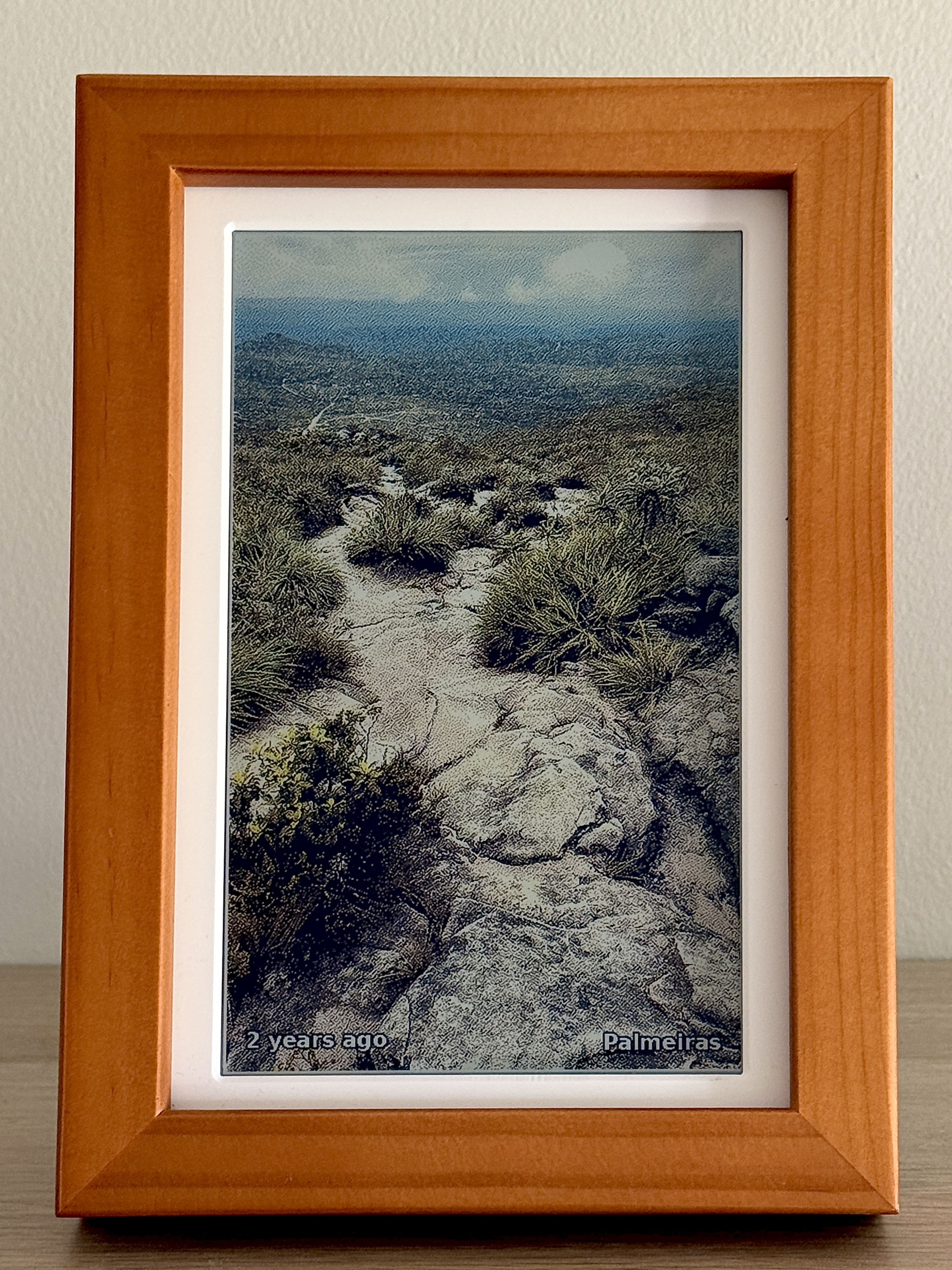
The bottom corners show the photo's capture age and EXIF location.
## Why
Most digital frames either make you hand-pick and preprocess photos onto an SD card, or they insist on talking to a cloud service like Google Photos. Realistically, that SD card gets refreshed once a year at best. As for cloud providers, I'd rather not hand them my most cherished memories or risk having those held hostage.
Coming home to a photo from earlier that day, or one from five years ago, hits differently when it's hanging on the wall instead of buried in your phone.
This was a fun afternoon project with Claude Code, followed by a bit of experimenting with different dithering and post-processing options, and then fine-tuning the photo-picking algorithm. Besides powering my frame, I'm sharing this repo as a reference and as self-hosting inspiration: combining these services made it possible to hack together something that would otherwise have been far harder to build.
## How it works
`src/display.py` runs every 15 minutes, triggered by cron. Each run:
1. Exits if the time is between midnight and 7 am.
2. Asks Home Assistant whether anyone in `HA_PRESENCE` is home. If nobody is, it exits to save power and to spare the e-ink panel unnecessary refreshes.
3. Picks a random photo from Immich. The pool is weighted: ~25% "on this day" memories, ~15% favourites, ~30% from the last 30 days, and ~30% everything else (if only the ±3-day fallback fires, the memories' share drops to 10% and the rest scale up accordingly). A 7-day rolling history prevents repeats, and photos matching the frame's orientation get 4x the weight of those that don't. Before accepting a candidate, the picker verifies that every detected head fits inside the crop with a small safety margin; candidates that fail are skipped. See [immich.py](./src/lib/immich.py).
4. Crops around any detected faces, boosts contrast and saturation (both of which e-ink lacks), dithers the image down to the 6-colour palette, and pushes it to the panel. The capture age and EXIF location are painted into the bottom corners as white text with a black stroke, so dithering can't smear the edges.
## Image pipeline
The two choices that matter most are `face_aware_crop` and Atkinson dithering.
### Cropping
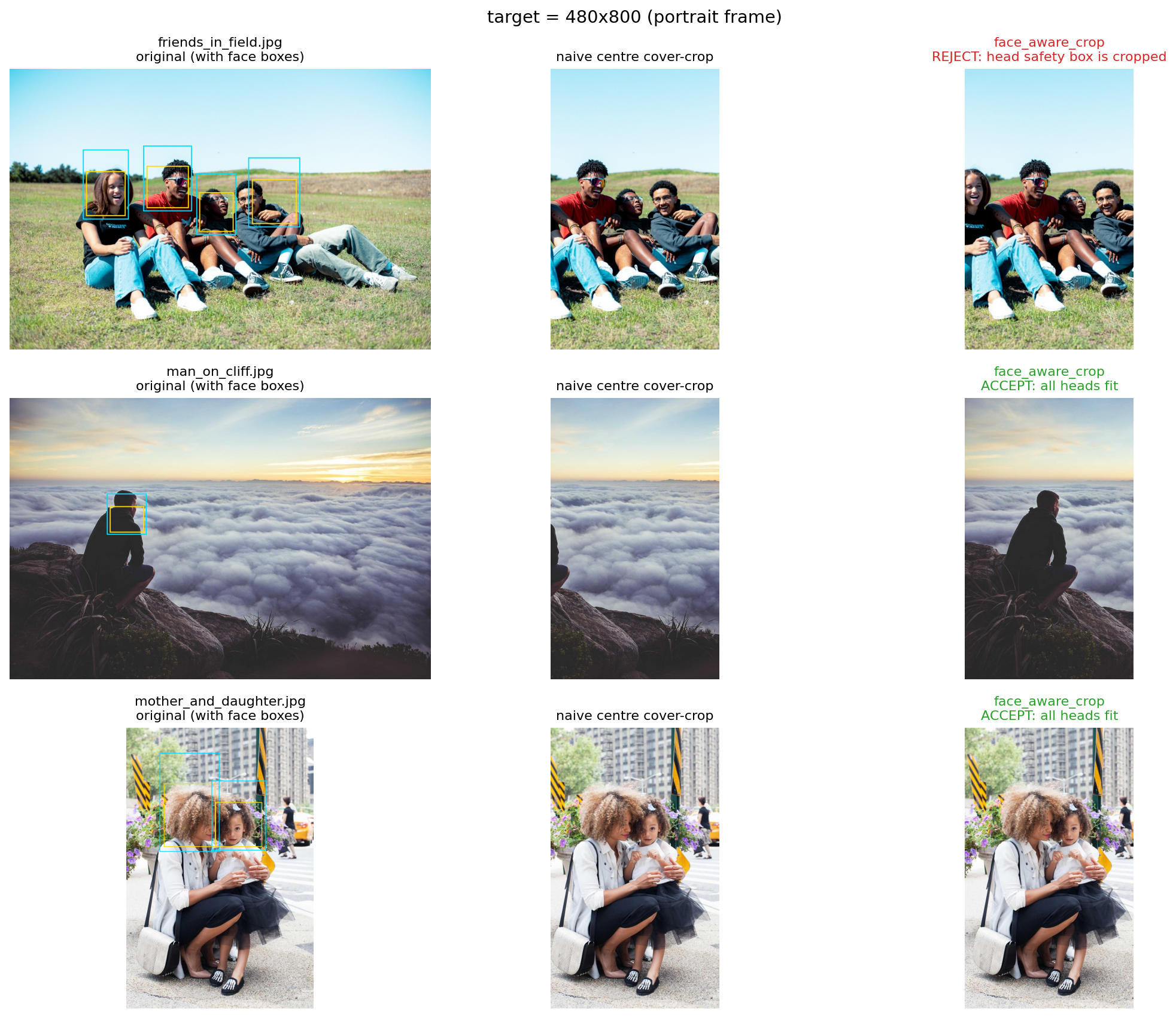
The frame can only hang in one orientation at a time, but I didn't want to limit it to showing only portrait or only landscape photos. So `face_aware_crop` resizes and crops each photo to fill the frame, biasing the crop towards the faces returned by Immich. A landscape shot with some room around the subject usually crops cleanly to portrait this way.
The important guardrail is `heads_fit_in_crop`: before the picker accepts a downloaded candidate, it checks the exact crop window against each face box, extended upward to cover the head and padded by `HEAD_SAFETY_MARGIN`. If the crop would cut into any visible padded head area, the photo is rejected and another candidate is tried.
The examples below, from [crop_compare.ipynb](./notebooks/crop_compare.ipynb), show how the head bounding boxes affect the final crop and which candidates would be accepted or rejected.
### Dithering
The panel can only show six colours: black, white, red, yellow, blue, and green. There's no intensity control like on an LCD; every pixel is exactly one of those six. To get anything legible we have to dither, and the many available algorithms have wildly different running times. [dither_compare.ipynb](./notebooks/dither_compare.ipynb) compares a few of them.
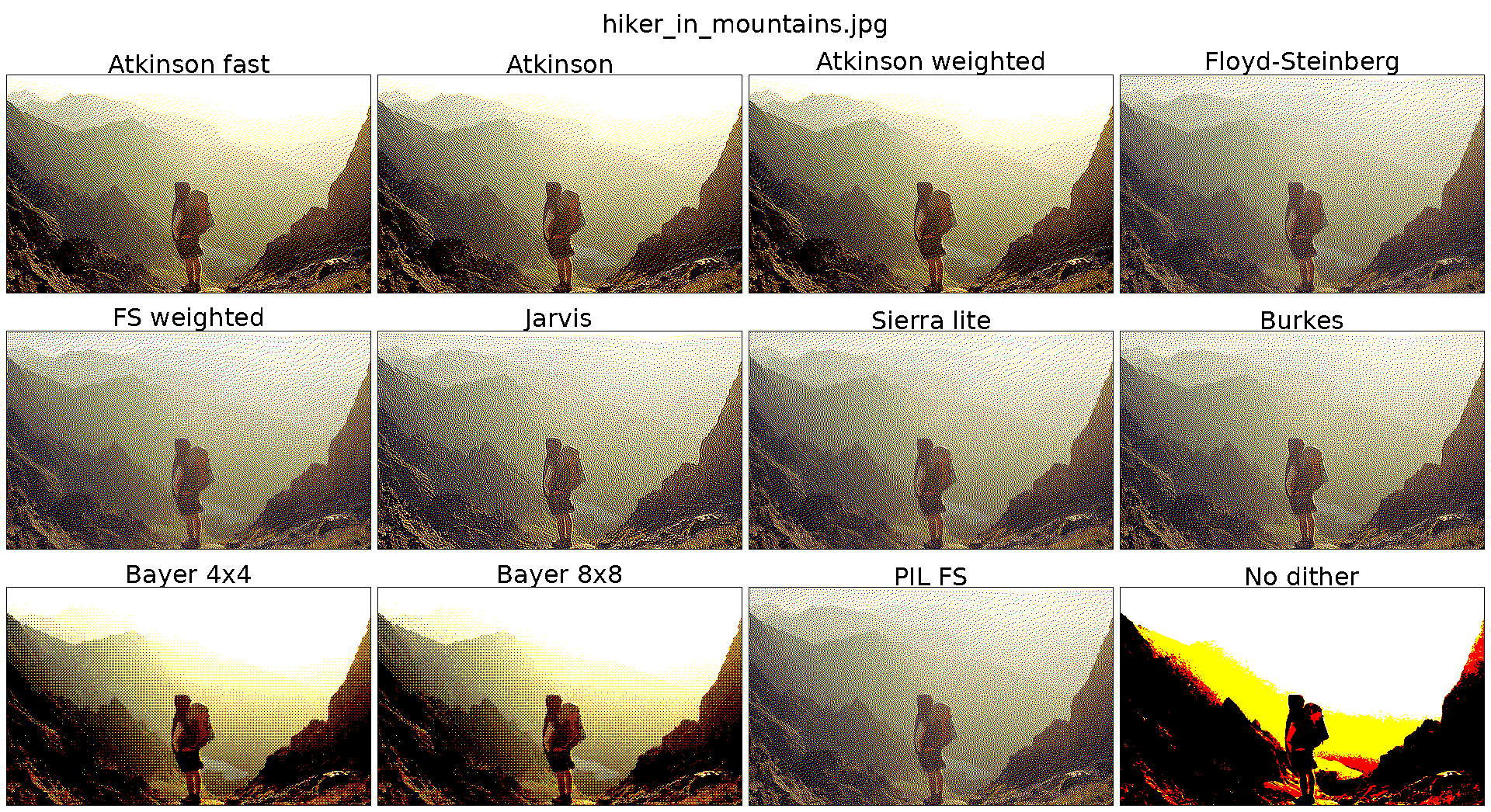
Ultimately, I chose Atkinson dithering, which seems to preserve the most contrast without introducing too many artifacts. Pure Python was unusably slow on the Pi Zero, so the inner loop runs through Numba with perceptually weighted (0.299/0.587/0.114) nearest-colour matching, making it roughly 100x faster once the compilation cache is warm.
## Setup
To run the project, copy [src/.env.example](./src/.env.example) to `src/.env` and fill it in:
| Variable | Purpose |
| ---------------- | -------------------------------------------------------------- |
| `IMMICH_URL` | Base URL of your Immich server |
| `IMMICH_API_KEY` | Immich API key (Account Settings, API Keys) |
| `HA_URL` | Base URL of your Home Assistant instance |
| `HA_TOKEN` | Home Assistant long-lived access token |
| `HA_PRESENCE` | Comma-separated entity IDs. Any `home` state triggers a render |
| `IMMICH_PEOPLE` | Default people for `--people` (must match Immich person names) |
| `SYNC_TARGET` | rsync target for `./sync.sh`, e.g. `pi@192.168.0.81:~/frame/` |
`.env` is gitignored.
Follow the [setup guide](./setup.md) for the remaining steps.
## Usage
The script accepts the following options:
```sh
python3 src/display.py # uses IMMICH_PEOPLE from the .env file
python3 src/display.py --album "Holiday 2025"
python3 src/display.py --people "Alice,Bob"
python3 src/display.py -o 90 # portrait orientation
python3 src/display.py --saturation 1.5 --contrast 1.1 --gamma 0.85 # change preprocessing settings
```
`display.py` only runs on the Pi itself (it needs SPI). For off-device experiments, see the Jupyter notebooks.
## Learnings
The Pi Zero 2W is overkill for this. It chews through the battery if you try to run without cables, and most of the time it just sits idle waiting for the next cron tick. This could have been mitigated by wiring an RTC timer to an interrupt pin and deep-sleeping in between refreshes, but the Waveshare board didn't come with that soldered on, and I couldn't be bothered to hack it in. If I were doing this again as a battery-powered build, I'd probably reach for an ESP32 with deep sleep: the 15-minute idle window leaves plenty of time for image processing and dithering, so performance wouldn't be a bottleneck.
A few small reliability quirks are worth knowing about. The Pi Zero 2W's Wi-Fi drops out when power saving kicks in, so a separate cron job runs `wifi-check.sh` every 5 minutes to reconnect. Swap is masked and journald is set to volatile, because SD card writes are the only thing likely to slowly kill this build. The render holds a `flock` so that a slow refresh never overlaps the next 15-minute tick.
I'd also like to try an [Inky Impression](https://shop.pimoroni.com/products/inky-impression?variant=55186435244411) with a custom-made frame, both for the larger display and perhaps for integrated lights, as the e-ink looks a bit muddled in evening lighting. I think a separate light source would be by far the greatest improvement.